Pi-star Captive Portal default remote password

Pi-star Captive Portal default remote password


The default Pi-star Captive Portal remote password is in Configuration <-> Expert <-> ircDDBGateway <-> at the end of the page and is In the remote password field.

Pi-star Captive Portal default remote password

Setup Pi-star WiFi captive portal

New to Pi-star 4.1.1 and plus versions is the WiFi captive portal, so how does it work and how to set it up.

A Captive Portal is a screen that will be shown initially to anyone who connects to your Wi-Fi Access Point. Before they can begin utilizing the Wifi connection, they will need to complete an action, until then, the captive portal will continually greet them.

You can display whatever you want on the captive portal, so it can be highly useful if you are going to lay out some ground rules to using your Wifi access point before a user gains access to it or whether you will require them to log in before getting access.


Pi-star security vulnerability

My Jumbospot based hotspot had been running continuously for weeks without problems, then I noticed that it had begun hanging most nights. This carried on for a couple of weeks with me trying out various configuration changes without success. Then I logged in via SSH one evening and got a "disk full" error message referring to "/var/log". When I checked, I found that the "auth.log" file had grown to fill the entire "/var/log" partition. Viewing it revealed that my hotspot was under continual attack from the internet - bots around the world were flooding it with login attempts with random user ids and passwords on a range of port numbers and protocols!

Pi-star Port settings to remotely access

which ports need to be forwarded if I do want to remotely access pi-star?
73 de Arnie W8DU

Amateur radio: SSH Updating hotspot firmware via Pi-Star

Firmware release notes on GitHub: ZUMspot/MMDVM_HS
  • Log into Pi-Star via SSH.
  • Run a Pi-Star Update:
  • sudo pistar-update
  • Note: If there's anything unusual about the update process, for example, if there are unusual error messages or it finishes with a "mount: / is busy" message, it might be a good idea to rerun the update and also to reboot before proceeding:
  • sudo reboot
  • Run one of the following commands:
  • Note 1: It isn't necessary to first put Pi-Star into read-write mode (rpi-rw); the script takes care of that.
  • Note 2: When you first enter one of the following commands, you'll see a message showing the current version of firmware that is installed on your hotspot, for example:
  • MMDVM_HS_Hat-v1.3.3 20180224 ADF7021 FW by CA6JAU GitID #d90263f
  • Press any key to write the hs_hat firmware to this modem or Ctrl-C to quit…
  • If you press any key to continue, the next thing you'll see is a message about the new version of firmware that is being installed, for example:
  • Flashing your hs_hat modem to the latest version
  • --2018-05-23 08:41:20-- http://github.com/juribeparada/MMDVM_HS/releases/download/v1.3.6/ install_fw_hshat.sh

    Download Update your hotspot! Pi-star Version 4.1.2 released (Video)


    Select : Configuration / Logon


    Select : Upgrade

    Or
    Downloads : https://www.pistar.uk/downloads/

    Pi-star Scraper and statistics using tools like Grafana

    Pi-star Scraper and statistics using tools like Grafana
    Python script to get data from the Pi-Star Dashboard and store it to InfluxDB

    you might also be interested in something I set up recently: a script which scrapes the Pi-Star dashboard regularly and puts the data into a database. With this, I have an unlimited activity history and can do nice statistics using tools like Grafana.

    Pi-Star security vulnerability

    ... have you opened it up to the outside world?

    My Jumbospot based hotspot had been running continuously for weeks without problems, then I noticed that it had begun hanging most nights. This carried on for a couple of weeks with me trying out various configuration changes without success. Then I logged in via SSH one evening and got a "disk full" error message referring to "/var/log". When I checked, I found that the "auth.log" file had grown to fill the entire "/var/log" partition. Viewing it revealed that my hotspot was under continual attack from the internet - bots around the world were flooding it with login attempts with random user ids and passwords on a range of port numbers and protocols!

    Pi-star Public Wifi Access auto authentication w//NO Mobile Phone

    Pi-star Public Wifi Access auto authentication w//NO Mobile Phone
    Pi-star MMDVM hotspot Jumbo hotspot and Public Wifi Issue

    Many public / guest Wi-Fi connections require a web browser to register for security reasons. Then a temporary password is issued, also a username.  Example; McDonald’s, Starbucks, Timhortons.

    The pi-star wifi configuration is provisioned only for a password or paraphrase.

    I have tried entering the temporary password that I acquired using my smart phone with no success.
    I have no problem connecting to my home router or friends and relatives Wi-Fi, but no joy in connecting to these other guest Wi-Fi’s.

    Is there a workaround for this or any suggestions?
    Since the pi star has no built in browser I am aware of.

    Pi-star Modem Log File

    To display the Pi-star Modem Log file in the browser, enter the following.

    Add the following URL to your PiStar into your browser

    Example:
    http://pistar.local/admin/download_modem_log.php
    /admin/download_modem_log.php


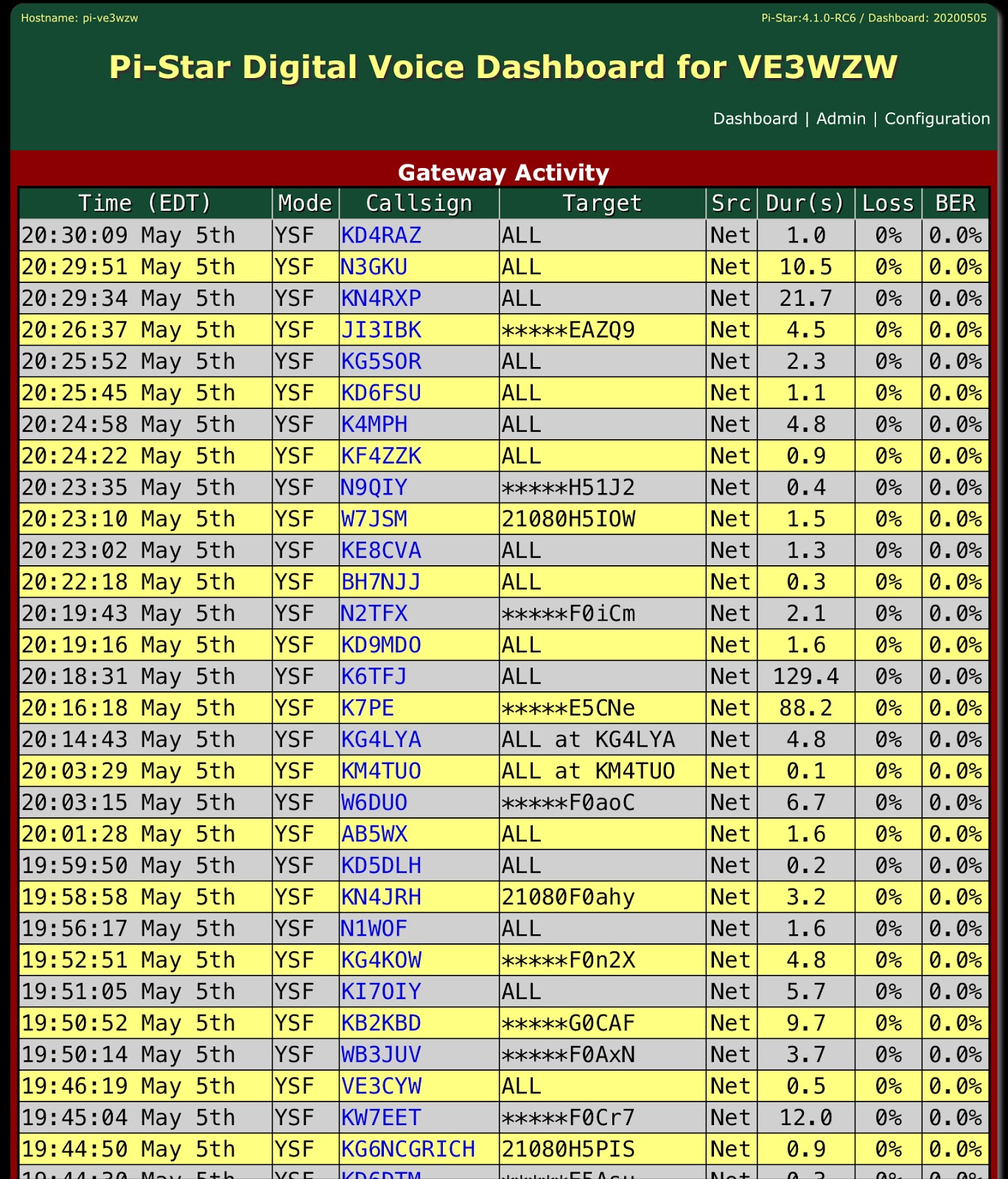
    Pi-Star (increase) - Dashboard - Gateway Activity List Screen Section

    Pi-Star (increase) - Dashboard - Gateway Activity List Screen Section

    I would like to offer a suggestion for the Pi-Star software. I believe this is something that would benefit more hams than just myself, especially Net Control operators.

    Concerning the Gateway Activity screen. Is it possible to have a configuration setting to allow the user to set more than 20 rows of activity. Displaying a vertical scroll bar on the right to go back and retrieve calls that have rolled off the screen? On the left side of the row, the number of rows desired would be set in the cofiguration menu. There is plenty of room on the left where the time is displayed to number each row so you can scroll backwards to look at any call signs that were missed because of the roll off.


    Pi-Star DMR Configuration - DMR+ Network: Options

    Pi-Star DMR Configuration
    DMR+ Network: Options

    Configuration ::
    DMR+ Master – Choose a nearby master server.

    DMR+ Network – Set up any options you want to use 1.

    Note 1: If you don't want to auto-connect to a talkgroup (when Pi-Star is set up as a hotspot),
    use: StartRef=4000;RelinkTime=60;UserLink=1;TS1_1=9;

    Note 2: If you turn off DMR Mode via MMDVMHost Configuration, these options aren't saved.

    When you turn on DMR Mode again with DRM+ or DMRGateway set as the DMR Master, you'll need to re-enter these options.